Welcome, Guest. Please login or register.
Did you miss your activation email?

Login with username, password and session length

 
Advanced search

878926 Posts in 32945 Topics- by 24353 Members - Latest Member: kanki

May 23, 2013, 12:21:30 AM
TIGSource ForumsDeveloperCreativeArtReferencesShare Your Palettes
Pages: [1] 2 3 4
Print
Author Topic: Share Your Palettes  (Read 11355 times)
JWK5
Guest
« on: April 04, 2012, 09:48:03 PM »

A good palette makes the drawing process a little easier so I figured I'd try starting a palette resource topic for us to all share and swap palettes in. Here's the base palette I am using currently (I put it together in GraphicsGale):


Here is the .PAL file if anyone wants it (it was saved in GraphicsGale, I am not sure what other apps use .PAL).
Logged
Fifth
Level 10
*****


yoster_5@hotmail.com
View Profile Email
« Reply #1 on: April 05, 2012, 08:29:48 AM »

A palette topic, fun!

Now, I typically have no idea what I'm doing when it comes to pixel art, so it's going to be a bit harder to justify my decisions in coming up with my messes of palettes...  But I still do enjoy dealing with them, even if they don't make much sense.

So, here are the ones I've dealt with to date...

NOTHNG7A.GIF

The palette I was using for Nothing, after several revisions.  The game was to be set entirely during night, so there's a lot of blues and purples.  Overall it wasn't too useful, and I ended up using very little of the palette.

NEWPLTTE.GIF

An attempt to come up with some more interesting colors for an art style I ended up being incapable of handling.  This palette kinda ended up being all over the place, and I barely ended up using at all; used in JiroSum, and nothing more.

DARKLED.GIF

I ended up thinking this one through a bit more than the others.  This one was made specifically for Illuminator, in such a way that any color I'd use would have an easy ramp towards dark blue, which served as darkness in the game.  Y'know, since the whole game was based off of light and darkness, and it would be doing a lot of transparency blending during runtime.  It worked well enough.

COLOURLY.GIF
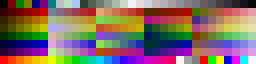
My latest attempt at an all-purpose palette, made specifically to try to keep me from relying on "safe" colors.  Admittedly, I didn't have much of a plan when making all those gradients, and a lot of space is now wasted on "useless" colors...  But I've at least gotten something out of it, so it's served its purpose well enough.


EDIT:  Oh wait, was this supposed to be more "art"-type palettes?  I went and posted my game-based ones instead.  I hope that's alright.
Logged
JWK5
Guest
« Reply #2 on: April 05, 2012, 12:20:31 PM »

EDIT:  Oh wait, was this supposed to be more "art"-type palettes?  I went and posted my game-based ones instead.  I hope that's alright.
Either is fine.
Logged
PsySal
Level 7
**


Yaay!


View Profile WWW
« Reply #3 on: April 05, 2012, 01:34:01 PM »

I'm IN like SIN! This is an awesome topic idea.

I use this palette in a new game:


It's for terrain. Actually I'm not super-happy with it, not enough GREEN. But we'll see.


I use this for The Real Texas when generating books for bookshelves/etc. The algorithm just chooses a pixel randomly for the color to use. It seems like old books once you take the dustcover are all mostly these sorts of colors (I wonder why? Probably some numinous reason going back to the dark ages...)


Logged
JWK5
Guest
« Reply #4 on: April 05, 2012, 07:51:02 PM »

Revised and reworked my palette. You can download it here (in .PAL format).

Logged
Hawt Koffee
Level 1
*


That's a wild fire.


View Profile WWW Email
« Reply #5 on: April 05, 2012, 08:13:05 PM »

all of them are stolen anyway
Logged
LazyWaffle
Guest
« Reply #6 on: April 06, 2012, 06:03:40 AM »

Just made one this morning.

Logged
keo
Guest
« Reply #7 on: April 06, 2012, 09:46:33 AM »

by cutting shapes out of the color wheel...

awesome, my mind is illuminated!  really never thought to do anything with the color wheel other than picking apart colors. 
Logged
Fifth
Level 10
*****


yoster_5@hotmail.com
View Profile Email
« Reply #8 on: April 07, 2012, 12:58:40 PM »

by cutting shapes out of the color wheel...

Yeah, that is genius.  Wow.
I'm gonna have to try that...
Logged
Randomasta
Level 1
*

wait what


View Profile
« Reply #9 on: April 07, 2012, 04:58:50 PM »

by cutting shapes out of the color wheel...
yeah, I'm totally stealing this technique
Logged
sublinimal
Level 6
*


This game is: UNPLAYABLE


View Profile
« Reply #10 on: April 08, 2012, 02:05:48 AM »

Damn. Cutting shapes out of the color wheel is so obvious it should be taught in "Pixel Art 101" tutorials, but somehow it's never occured to me.
Logged

Megaproject: Panacea
Big project: that other game
Control Room is dead, long live Veins of a Planet
Latest jam game: Vineyard Adagio (LD26)
JWK5
Guest
« Reply #11 on: April 08, 2012, 03:04:13 AM »

I put together a palette mimicking the "old master" paints for creating graphics with a classical painting look.

You can download the .PAL here.


Logged
John Sandoval
Level 10
*****


too kawaii to live


View Profile WWW
« Reply #12 on: April 08, 2012, 03:20:13 AM »

:0
Logged

thatshelby
Level 10
*****


View Profile WWW
« Reply #13 on: April 08, 2012, 10:06:54 AM »

JWK5
Logged
rdein
Guest
« Reply #14 on: April 08, 2012, 10:21:57 AM »

JWK5
Logged
Pages: [1] 2 3 4
Print
Jump to:  

Theme orange-lt created by panic